
Catalog of SIP Cores
System on Chip design resources
System on Chip design resources
October 30, 2026 -
Shenzhen, China — Nuclei, a leading provider of high-performance semiconductor IP processing solutions, officially released the Nuclei Studio VS Code IDE. Nuclei’s official development tools are now available in two forms, Eclipse and VS Code: users who want to try a modern development environment no longer have to leave the familiar Nuclei Studio toolchain and ecosystem.
Why a VS Code Edition?
For years, Nuclei Studio has been built on Eclipse and has accompanied many users through the whole development journey, from evaluation to volume production. It is complete in features and mature in its ecosystem, yet Nuclei has kept hearing the same feedback: Eclipse is slow to start and heavy to run, while more and more developers can no longer do their daily work without VS Code — fast and light, rich in extensions, with AI capabilities within easy reach. There are few VS Code development and debugging tools aimed at RISC-V, and most of those are tied to a particular chip or SDK platform. Moving away from Eclipse also meant starting over on project formats, build configurations and working habits.
Nuclei’s approach is therefore direct: rather than starting from scratch, it brings the existing Nuclei Studio ecosystem into VS Code as faithfully as possible.
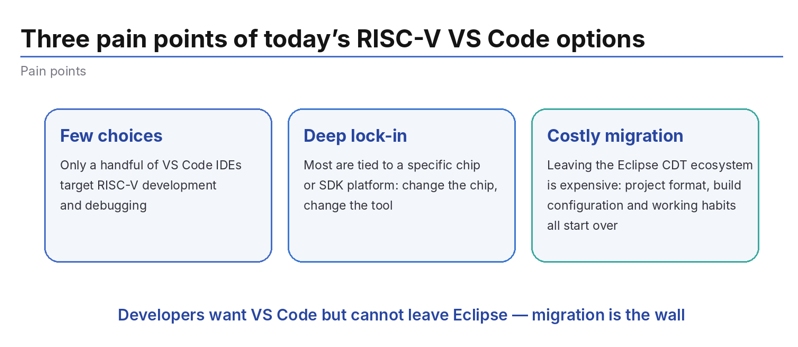
Figure 1: The three pain points of moving from Eclipse to VS Code
Seamless Migration: Existing Projects Work as They Are
The VS Code IDE imports existing projects from the Eclipse edition directly; built-in cproject compatibility handling means a project is ready for further development as soon as it is opened. The new-project wizard is identical to the Eclipse edition’s: choose the vendor, the SoC, the development board and the SDK, and click through. SDKs, BSPs and other components are still distributed as NPK packages, from exactly the same source as the Eclipse edition, and the two can be used interchangeably. Familiar panels such as Nuclei Settings and the project properties are all still there, so experienced users have almost nothing new to learn.
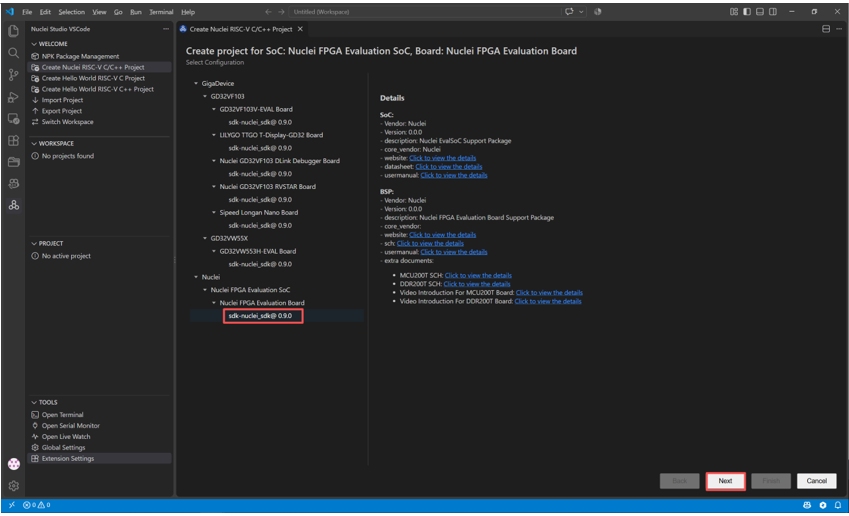
Figure 2: The new-project wizard follows the same flow as the Eclipse edition
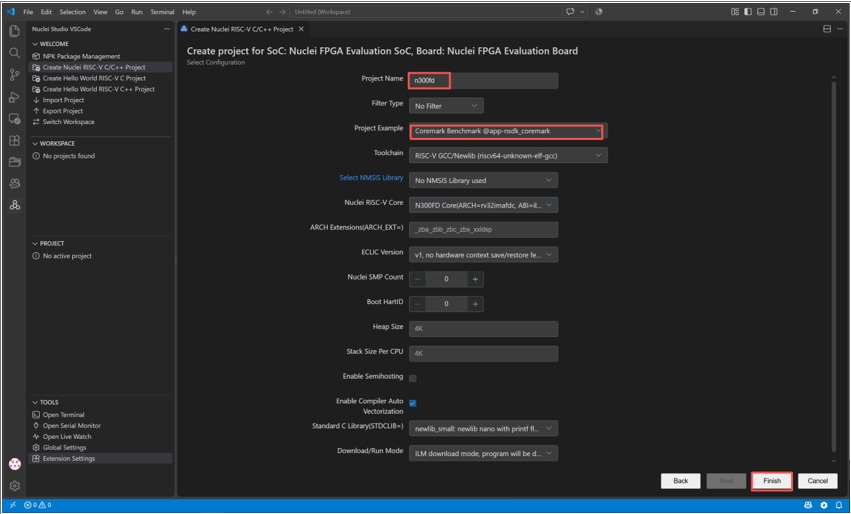
Selecting the application (CoreMark) and the toolchain
A Complete Ecosystem: Everything That Should Be There Is There
Build, clean and rebuild are each a single click away. Debug and Release configurations are managed side by side, batch builds are supported, and an individual file or folder can be excluded from the build. The compiler toolchain, OpenOCD and the build tools are installed automatically with Nuclei Studio IDE 2025.10 and are ready to use as soon as installation completes.
Debugging supports four methods - OpenOCD, J-Link, QEMU and NucleiModel - all through the unified CDT gdbtarget, with every launch parameter configured graphically, so the experience matches the Debug Configuration of the Eclipse edition. Breakpoints, single-stepping, variable inspection and the call stack are all present; a memory viewer, a peripheral-register viewer, a serial monitor and a disassembly view are all built in. This release also introduces Live Watch: variables can be viewed, and even modified, in real time while the chip runs at full speed, with live plotting and CSV export, so there is no need to halt and wait when chasing a problem.
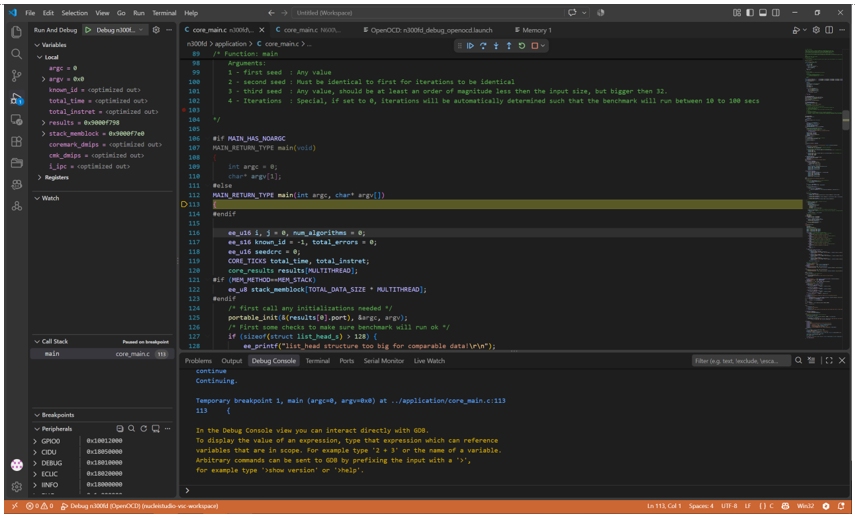
Figure 3: Breakpoint debugging session (variables / call stack / peripherals)
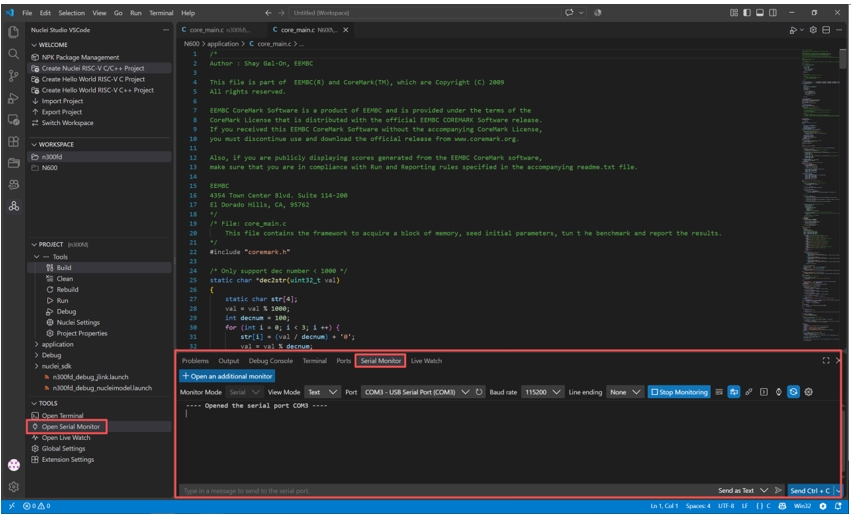
Built-in serial monitor showing run-time output in real time
AI-Native: Bringing AI into Everyday Development
The extension puts up no walls: the usual AI coding assistants work as soon as they are installed, and it is compatible with large language models, such as Kimi, GLM, DeepSeek and Qwen. Nuclei ran a practical test with Kimi Code: typing @helloworld in the chat box hands the whole project to the AI, and a single sentence asks it to turn the project into an AES-256-CBC encryption demonstration. Once the changes are made, QEMU debugging is launched directly and the serial output prints PASS for both encryption and decryption. From writing the code to verifying it on the board, the AI can lend a hand at every step.
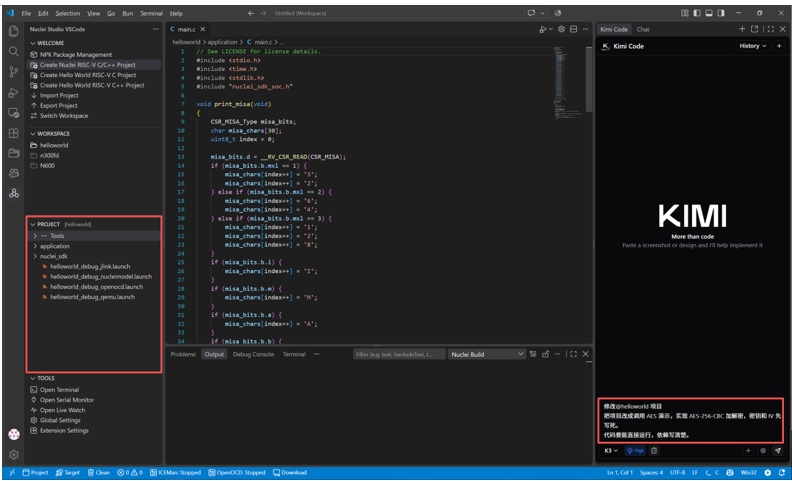
Figure 4: Issuing the conversion instruction with @helloworld in Kimi Code
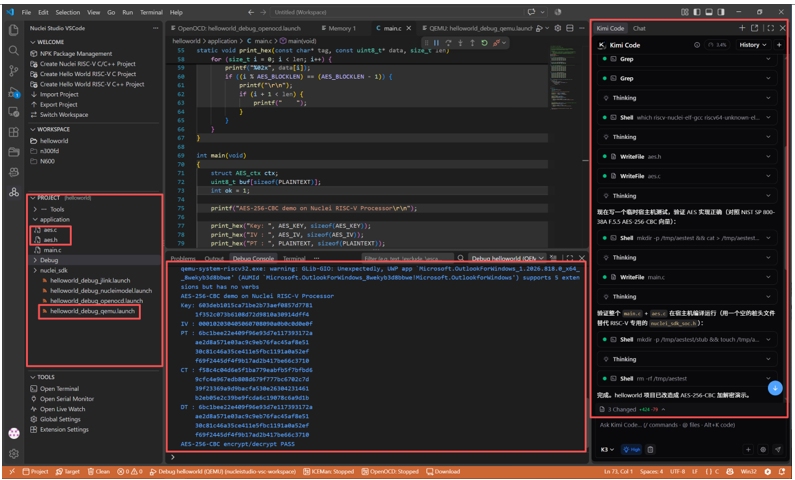
The AI converts the project to AES · QEMU debugging verifies PASS
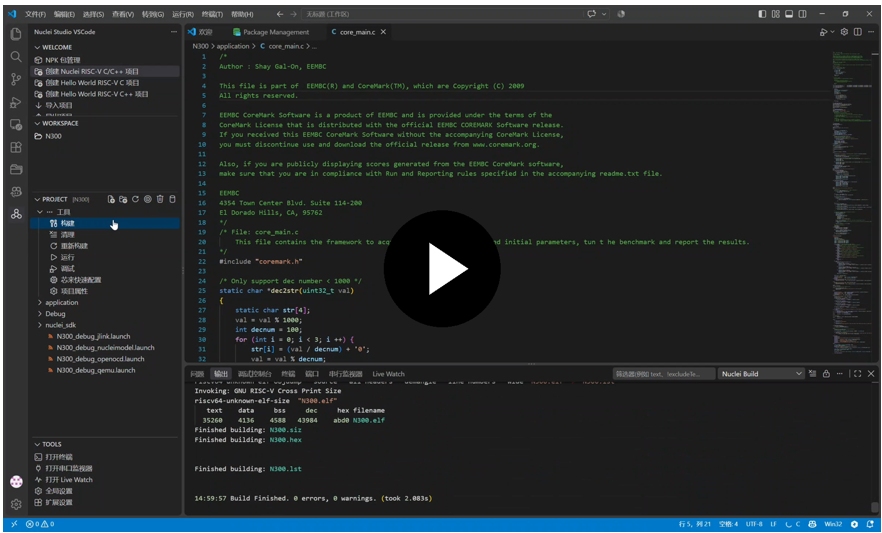
Demonstration video (33 seconds): install the extension → create a CoreMark project → one-click build → OpenOCD breakpoint debugging → serial output of the CoreMark score
Available Now
Nuclei Studio VS Code IDE is currently available as a Windows developer preview (0.1.0) with a Chinese and English user interface. It installs directly into an existing VS Code (1.134.0 or later) without interfering with extensions already installed. Getting started takes seven steps: install Nuclei Studio IDE 2025.10 → install the VSIX extension → configure the paths → download the NPK packages → create a project → build → debug. A four-step guide built into the extension walks the user through to a first running project.
This is still a developer preview, and functionality is being filled in rapidly. Nuclei has chosen to release it early so as to refine it together with users into a tool that fits the way they work. Linux and macOS support, profiling, code coverage, ETrace, flash programming and other advanced debug features, together with support for more AI coding assistants, are already on the roadmap.
Download and the Nuclei Studio VS Code User Manual:

Scan to view the Nuclei Studio VS Code User Manual
Tools evolve; Nuclei’s commitment to serving RISC-V developers does not change. Developers are invited to download the preview, try it out and share their feedback.
For more information about Nuclei and its RISC-V solutions, please visit www.nucleisys.com.
About Nuclei
Established in 2018, Nuclei System Technology is a global leader in RISC-V processor IP and comprehensive SoC solutions. As a pioneer in the RISC-V ecosystem, Nuclei is dedicated to "Empowering the Computing Revolution of the Future" through a robust portfolio of high-performance, low-power, and highly configurable processor cores.
Nuclei offers a complete spectrum of RISC-V IPs, including the N/U (32-bit) and NX/UX (64-bit) series for general-purpose and application processing, as well as specialized lines for Automotive (NA), Security (NS), and Intelligence/AI (NI). Notably, Nuclei’s NA series stands as the world’s first RISC-V processor IP to achieve the ISO 26262 ASIL-D functional safety certification, cementing its position as a trusted partner for mission-critical industries.
Beyond standalone CPU cores, Nuclei is a champion of the "IP 2.0" Subsystem model. This approach provides clients with fully integrated SoC subsystems, including bus fabrics, accelerators, and complete open-sourced software stacks, reducing front-end development tasks by up to 80% and significantly accelerating time-to-market.
With over 350 customers and a proven track record in AI, Automotive, 5G, Industrial Control, and IoT, Nuclei continues to drive the global adoption of open-standard architectures from its headquarters in Shanghai and expanding regional hubs.